Posts

Spell Checker - now working 7th April 2014 8:59 PM
“Is it a different version from the previous one? I thought the previous one auto corrected, where as this one just seems to slap a red line underneath the miss spelt word.....”
 

The old vBulletin forum used it's own built in spell checker. The spell checker for the new editor is a bit ropey, so we have disabled it, and set it to automatically use the built in spell checker that your web browzer uses.

Below is a screen shot from Google Chrome, if you right click the mis-spelled word, you get suggestions.

In Internet Explorer, depending on the version, it may either auto correct, or if you right click you get the options as below:


Spelling variants can also depend on the language set up by your system, eg English UK, English USA etc. 

Hope that makes sense.

Normally average between 5 - 6 hours a night. As long as I get a coffee bump start in the morning, I'm all right.

Think it is the curse of being a business owner, and interesting seeing Barneys response. Suspect it will catch up sooner or later 

Anyone getting auto logged out? 7th April 2014 5:10 PM

Have a report of user accounts getting auto logged out after 5 minutes of inactivity using Windows 8 and the Firefox web browser.

We're not using any auto logout settings, and unable to replicate the issue with any browser or Operating System combination.

Has anyone else been auto logged out from the forum? eg you've logged in, wondered off, or opened a new browser tab done something else, then re-visited the forum later on and had to log back in?

Proving to be an odd one to track down, so if anyone has the same problem, be much appreciated if you could let me know by replying to this thread. Ta very much 

It is incredibly confusing, and frustrating!

Assuming you can't use the phone number as part of the recovery options?

Or see it via your places control panel - http://google.com/lbc If you can, then as legalstop says, you could request a new postcard.

Don't know if this will help, I know Google are in the process of migrating us over to a new places dashboard. Apparently it will be easier to manage places pages, and assign ownership:

GOOGLE PLACES FOR BUSINESS LISTINGS CAN NOW BE TRANSFERRED TO A NEW OWNER VIA G+ PAGE  - MIKE BLUMENTHAL


Another idea, can you go into your security settings and reset your recovery info?

https://www.google.com/settings/security


Otherwise only thing I can think of is the Places Forums, but sounds like you've been there already

https://productforums.google.com/forum/#!forum/business

Hiya Ryan

Have you had no joy with the recovery options?

https://www.google.com/accounts/recovery

Bugs and Issues 6th April 2014 5:19 PM

Thread Notifications in profile and email alerts.

These now should only alert from 1st April 2014 onwards, so should stop any spurious older thread update notifications.

Let me know if anyone is still getting any issues.

Bugs and Issues 5th April 2014 5:04 PM

Pop up boxes

These now only appear once the first time you log in (starting from now), then they disappear, ie the notification box that says you have 10 minutes to edit your post/thread.

If you don't visit the forum for 3 months, then the notifications will display again one on your next visit.

Hopefully that should suit everybody.


Bugs and Issues 4th April 2014 5:26 PM
“Have trimmed the thread to concentrate on the issues Barney has flagged.

1. Seeing the forum on 1/4 of a desktop screen (in Internet Explorer 11) is a bug which is showing the mobile site by mistake - being investigated.

4. Social Media information the wrong way round in the profile (eg facebook information was in the twitter box and the twitter information was in the facebook box) - being investigated

5. Add an option to stop pop up notification boxes from showing, eg edit post, thanks etc - being investigated


Issues Update:

1. Seeing the mobile forum on a desktop device - this one has us baffled and we are unable to replicate it. The issue flagged by Barney was only on IE 11, but we have tried all versions of IE and different versions of Windows, but can't replicate the fault. 

The mobile redirect code is actually the same that has been running on the My Local Services Directory for years, and we've never had an issue reported. So we genuinely stumped!

If anyone else has also seen our mobile content (forum or directory) displaying on a desktop device, would really appreciate you letting us know, or replying to this thread, as would love to get to the bottom of this one, and it's currently an X file 

Points 2 and 3 are fixed.

4. Social Media info the wrong way round - I think we have this cracked. It was ahem, me  As part of the cut over, I tided up a lot of profiles and edited some social media URLs, as we found a bug during testing. I think this was simply me pasting the wrong URL in the wrong box...

5. We are investigating some options reference the pop up boxes to make them auto disappear. 

6. Subscribed Threads emails - these were initially sending out old threads, as we didn't have a time and date stamp from the old forum database. Hopefully these should start to sort themselves out, and by next week only current threads you have subscribed to will be in the daily notification email.

Bugs and Issues 4th April 2014 5:05 PM
Thanks for the feedback Martin
 
1. On the login page it states Lowi Ltd at the top.  Presume you really want it to say MLS?
 
Assume you mean the certificate info?
 
We use an Extended Validation SSL Certificate for user security, so it covers sign up and edit pages, should hopefully give piece of mind we take security seriously, and visually shows we encrypt data. The certificate is registered to Lowi Ltd our legally registered name, which Trades as My Local Services.  


2. I've just changed my password - but didn't get sent to a page stating successful.  It just takes me to a page asking where I want to go...   ...would be good to know if successful, without having to logout and back in”

Took a while to work this one out  The issue here is because you have a business listing, so we have synchronised your business listing with your forum profile.

What we didn't want was 2 password databases, and users having to have to separate accounts and passwords. So if you have a business listing, these details also become your login details for the forum.

For members with business listings, if you go to your forum profile, select edit, and then opt to change your password, the password box is greyed out and there is a message that says you will change your password from your business listing:

Once you select the "click here" to update your password, you change password screen opens:
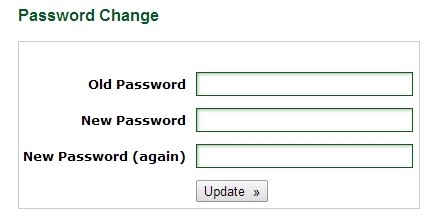
 

You have to re-enter the password, and then press update (it will error if they don't match).

Your details are now using the new password, so there is no need to log out or back in, why would you?

Once you select update, it then takes you to your business listing control panel.

We could add a pop up box saying "password saved successfully" but I'm getting the impression pop up boxes can cause an annoyance for a lot of people.
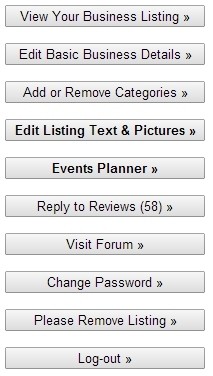
Once you have selected update, as you have a business listing with us, we take you to your business listing control panel.

There are a lot of options, but one of the options there is Visit Forum, which will take you back to the forum page.

But as you use the same credentials to edit your business listing as you do to post on the forum, it seemed logical (to us ) to send you to your main control panel, as you may decide to re-visit and update your listing.

All sounds a little complicated when you write it down, but I'm hoping it's a little more obvious when members try it.

Plus this is only for forum members who have a business listing, and want to change their password.


For forum members who don't have a business listing, it's simply a case of going to their profile, selecting edit, and changing the password. 
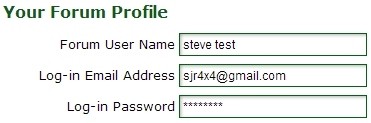
Once you save it, the screen the returns you to your forum profile.


But if multiple people are finding it confusing, or we need to change any wording to make it clearer, then let me know. 

“No argument there. This post is 12 months old, and mobile was already important, now it is essential /critical...

...That said, we're currently rebuilding the forum onto a new platform, and the mobile version is currently up in the air, so maybe we will end up with a responsive design and I'll have to eat my own words (won't be the first time..)”
 

Well we weighed up the pros and cons, and I'm still a believer that a dedicated mobile site is still a better solution in certain situations, which is why we have stuck with a cut down and separate mobile site for the new forum design. Other forums have gone the responsive route, which I think have mixed results.

I guess time will tell if we were right or wrong!
